

The Environmental Conditions Page allows you to configure the weather and environmental parameters that influence solar resource modeling in your prediction. This includes selecting weather data, defining soiling and spectral loss profiles, setting design temperatures, and importing horizon scene data.Documentation Index
Fetch the complete documentation index at: https://docs.plantpredict.com/llms.txt
Use this file to discover all available pages before exploring further.
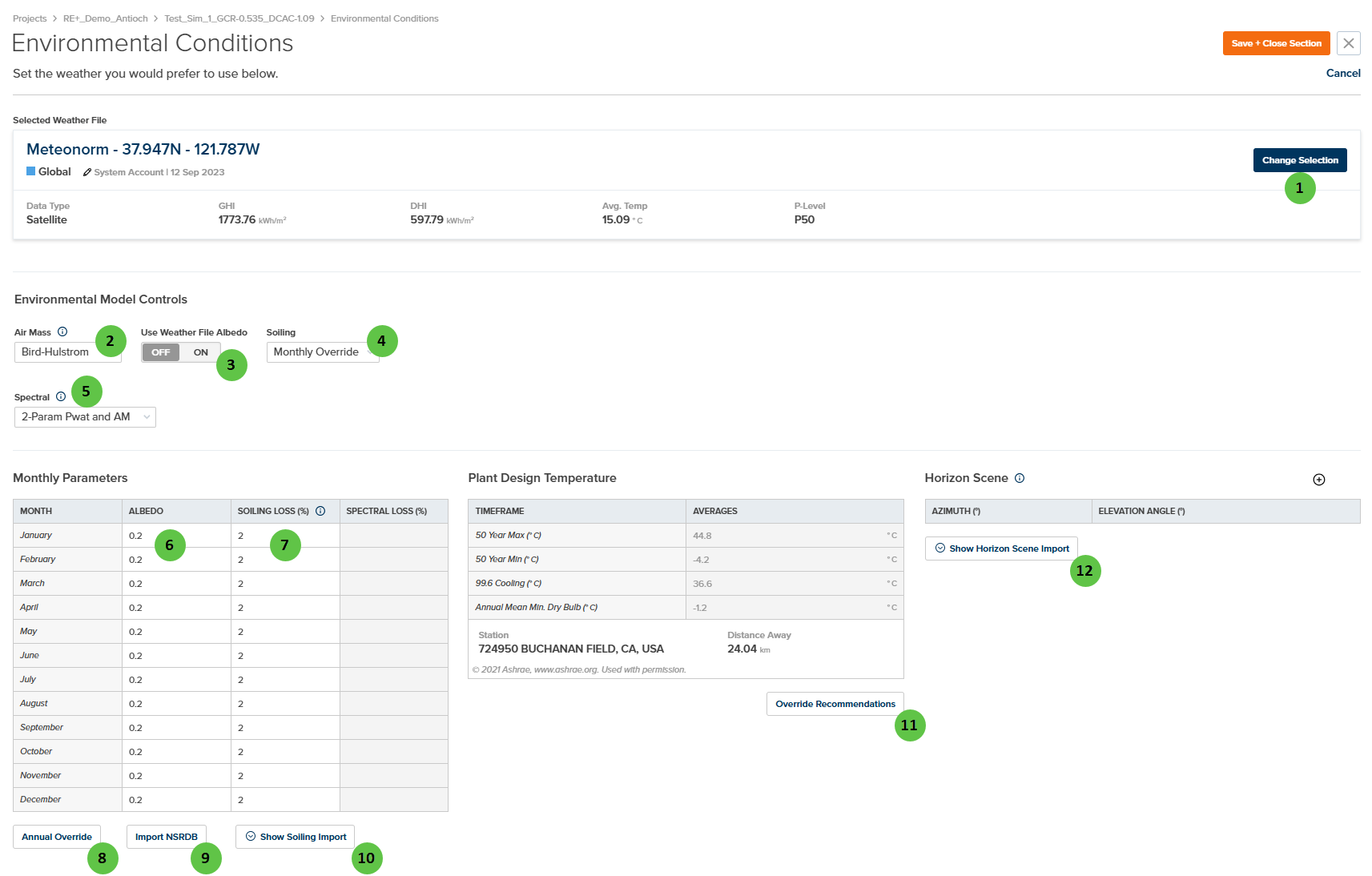
Overview
The Environmental Conditions page is organized into four main sections:- Selected Weather File — Displays the currently selected weather file with key metadata (GHI, DHI, average temperature, P-Level) and allows you to change the selection.
- Environmental Model Controls — Configure the algorithmic models used for air mass calculation, albedo sourcing, soiling losses, and spectral shift adjustments.
- Monthly Parameters — Define month-by-month values for albedo, soiling loss, and spectral loss when using monthly override modes.
- Plant Design Temperature & Horizon Scene — Set temperature design points for voltage calculations and import far-field horizon shading data.
User Inputs
| # | Input | Type | Units | Description | Related Documentation |
|---|---|---|---|---|---|
| 1 | Change Selection | Button | — | Opens the weather file selection dialog to choose a different weather file for the prediction. Weather files contain hourly or sub-hourly irradiance, temperature, wind speed, and other meteorological data. | Weather Library, Weather File |
| 2 | Air Mass | Dropdown | — | Selects the air mass calculation model. Options: Bird-Hulstrom or Kasten-Sandia. Air mass quantifies the optical path length through the atmosphere and affects transposition, decomposition, and spectral calculations. | Air Mass Model |
| 3 | Use Weather File Albedo | Toggle | — | When ON, albedo values are read from the weather file (if available). When OFF, user-defined monthly albedo values from the Monthly Parameters table are used. | Bifacial Irradiance |
| 4 | Soiling | Dropdown | — | Selects the soiling loss model. Options: None (no soiling), Monthly Override (user-defined monthly values), or Weather (time-series values from weather file). | Soiling |
| 5 | Spectral | Dropdown | — | Selects the spectral shift adjustment model. Options: None, Monthly Override, 1-Param Pwat or Sandia, 2-Param Pwat and AM (Spectral 2). Spectral adjustments account for module performance variations due to atmospheric conditions. | Spectral Shift Adjustment |
| 6 | Albedo | Table Column | — | Monthly ground reflectance values (0 to 1). Typical values: 0.2 for grass/soil, 0.6+ for snow. Used in bifacial rear-side irradiance calculations and ground-reflected irradiance. | Bifacial Irradiance |
| 7 | Soiling Loss (%) | Table Column | % | Monthly soiling loss percentages (0 to 100%). Represents irradiance reduction due to dust, dirt, and particulate accumulation on module surfaces. Only editable when Soiling model is set to Monthly Override. | Soiling |
| 8 | Annual Override | Button | — | Opens a dialog to set a single annual value that will be applied to all 12 months for albedo and/or soiling loss. Useful for simplified modeling scenarios. | — |
| 9 | Import NSRDB | Button | — | Imports albedo and/or other environmental data from the National Solar Radiation Database (NSRDB) based on the project location. | — |
| 10 | Show Soiling Import | Button | — | Opens the soiling import interface to load soiling loss data from external sources or soiling models. | Soiling |
| 11 | Override Recommendations | Button | — | Opens a dialog to manually override the ASHRAE-derived plant design temperatures. Design temperatures are used for module voltage calculations at temperature extremes. | — |
| 12 | Show Horizon Scene Import | Button | — | Opens the horizon scene import interface to define far-field obstructions (mountains, trees, buildings) that block direct beam irradiance at low sun angles. | Horizon Shading |